Engine Architecture
Welcome to the heart of Traktor! Understanding the engine’s architecture will help you make better decisions when building your games and tools. This guide explains how Traktor is organized and why it’s designed this way.
The Big Picture
Think of Traktor as a well-organized toolbox. Each tool has its place, and you always know where to find what you need. The engine is built in layers, where lower layers provide fundamental services that higher layers build upon. This approach keeps things clean, predictable, and easy to extend.
The architecture is designed around four key principles:
Modularity means each system has clear boundaries and responsibilities. The physics system doesn’t need to know about rendering internals, and the audio system doesn’t care about networking details. This separation makes the code easier to understand and maintain.
Performance is baked into every design decision. From reference counting to SIMD math operations, the engine is built to run fast on real hardware. But it achieves this without sacrificing clarity. You can still read and understand the code.
Flexibility comes from data-driven design. Rather than hard-coding game logic, you define behavior through assets and scripts. This means designers can iterate quickly without waiting for programmers to recompile.
Maintainability is about writing code that future you will thank current you for. Consistent naming, clear dependencies, and good documentation mean you can come back to code months later and still understand it.
Understanding the Layered Architecture
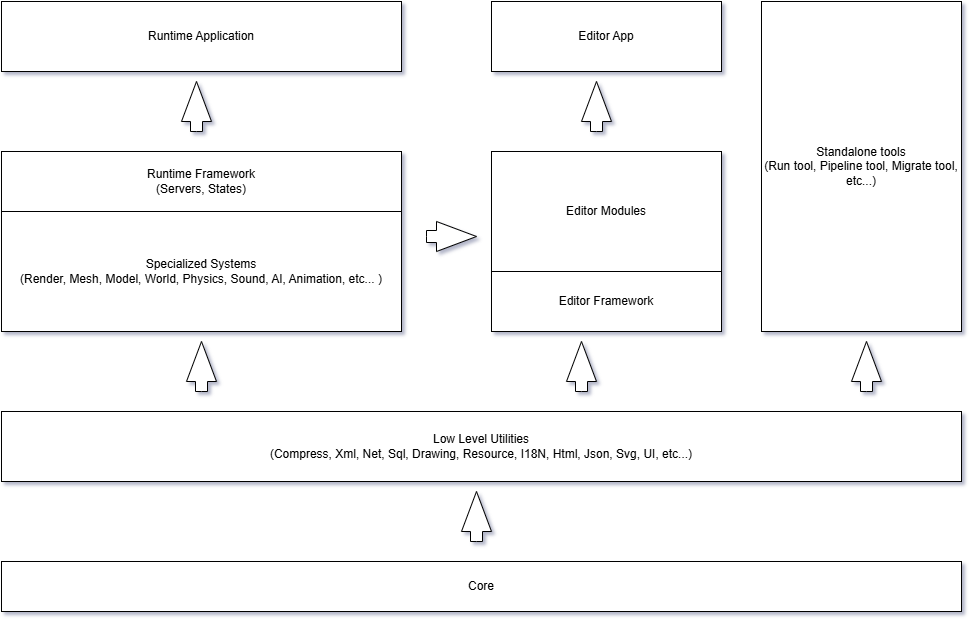
Traktor’s architecture resembles a building with a strong foundation and increasingly specialized floors. The diagram above shows how the engine is organized into layers, starting from the bottom and working up.
Dependency Rules:
- Each layer can only depend on layers below it
- No circular dependencies between modules
- Layer 2 (Specialized Systems) builds on Layers 0-1 and provides all game engine subsystems
- Layer 3 has three parallel branches:
- Runtime Framework - Game orchestration (builds on Layer 2 specialized systems)
- Editor Framework - Authoring tools and asset pipeline (builds on Layers 0-2)
- Standalone Applications - Utility apps like Run.App, SolutionBuilder.App (build on Layers 0-2)
- Runtime.App builds on the Runtime framework
- Editor applications (Editor.App, Pipeline.App) build on the Editor framework
- Editor modules (.Editor suffix) extend the Editor framework but are separate from runtime code
- Core has zero dependencies - it’s the foundation for everything
Layer 0: Core - The Foundation
Everything starts with the Core module. This is the bedrock that all other systems build upon, providing the fundamental services that make a game engine possible.
The Core gives you platform-agnostic access to essential features. Whether you’re running on Windows, Linux, or macOS, the Core handles the differences so your code doesn’t have to worry about it. It provides custom container types optimized for game development, threading primitives for parallel processing, a comprehensive math library for 3D calculations, and utilities for file I/O, logging, and debugging.
The Object System and Reference Counting
Almost everything in Traktor inherits from a base Object class. This gives every object three superpowers: automatic memory management through reference counting, runtime type information (RTTI) for dynamic type checking, and built-in serialization for saving and loading.
Here’s what this looks like in practice:
// Create a scene - refCount starts at 1
Ref<Scene> scene = new Scene();

// Pass it around, share it with other systems
Ref<Scene> sceneAlias = scene; // refCount is now 2

// When references go out of scope, the object cleans itself up
// No manual delete needed, no memory leaks
This approach eliminates entire classes of bugs. You don’t have to track who “owns” an object or when it’s safe to delete. The reference counting handles it automatically, and cleanup happens at predictable times (unlike garbage collection which can cause unpredictable pauses).
Important note about circular references: While reference counting is powerful, be aware that circular references (A references B, B references A) can prevent objects from being deleted. Use weak references when needed to break cycles.
What’s in the Core Toolbox?
Containers are the data structures you’ll use everywhere. Traktor provides AlignedVector<T> for arrays with specific memory alignment (important for SIMD optimization), SmallMap<K, V> for efficient lookups, RefArray<T> for collections of reference-counted objects, and RefSet<T> for unique collections. These aren’t just wrappers around STL. They’re optimized for the access patterns common in game engines.
Threading support is crucial for modern games that need to use all available CPU cores. The Core provides classes like Thread, Semaphore, and CriticalSection, but most importantly, it offers a JobQueue system for distributing parallel work efficiently. Rather than spawning threads manually, you submit jobs that get executed by a managed thread pool.
Math operations are the backbone of 3D graphics and physics. The Core’s math library uses Vector4 for 3D positions (the fourth component is used for homogeneous coordinates), Matrix44 for transformations, Quaternion for rotations (which avoid gimbal lock), and types like Aabb3 (axis-aligned bounding boxes) and Frustum for spatial queries and culling.
I/O and Serialization let you read and write data. The IStream interface abstracts different data sources, FileSystem handles platform-specific file operations, and the serialization system can save objects to binary or XML formats. This is how scenes, assets, and save data get persisted to disk.
Logging is your window into what the engine is doing. A simple but powerful system lets you write messages at different severity levels:
log::info << "Loading scene: " << sceneName << Endl;
log::warning << "Texture quality reduced due to memory constraints" << Endl;
log::error << "Failed to initialize audio device" << Endl;
Layers 1-2: Building Blocks
Built on top of Core are the general-purpose modules organized into increasingly specialized layers. These modules are reusable by both the runtime (your game) and the editor. They don’t assume anything about whether they’re running in development or in a shipped game.
Layer 1 (Low-Level Utilities) provides foundational services like compression, XML/JSON parsing, networking, SQL database access, 2D drawing, resource management, internationalization, and vector graphics. These are the basic tools that higher layers depend on.
Layer 2 (Specialized Systems) provides all the major subsystems needed for game and application development. This includes Database for asset storage, Render for Vulkan-based graphics, Sound for multi-channel audio, Input for devices, Ui for windowing and controls, Model for 3D model data, and Video for playback. The entity-component system (World) implements the pattern that ties everything together—entities are game objects, and components define their behavior and appearance. Physics provides simulation and collision detection, while Scene manages scene graphs and rendering hierarchies. Script enables Lua integration for gameplay programming. Heightfield provides terrain data structures. Specialized game systems like Mesh (rendering), Animation (skeletal, IK, ragdoll, cloth), Spray (GPU particles and effects with sound), Weather (sky and precipitation), Terrain (large outdoor environments), Theater (cutscenes), Ai (pathfinding), Online (multiplayer), and Spark (in-game UI) round out the game development toolkit.
Each module can exist in up to three variants: the base general-purpose code, editor-specific extensions (.Editor suffix), and platform-specific implementations. This keeps editor tools separate from runtime code, ensuring your game stays lean.
Layer 3: Runtime and Editor Frameworks (Parallel)
At Layer 3, the architecture splits into two parallel frameworks: Runtime (for games) and Editor (for authoring). Both build on the same foundation (Layers 0-2) but serve different purposes and remain independent.
Runtime Framework
The Runtime framework is where your game lives. It orchestrates all the general modules through a server-based architecture.
The runtime defines an Application class that manages the game’s lifecycle. Different subsystems are implemented as “servers” that get initialized, updated, and shut down in a controlled manner:
- IRenderServer handles graphics rendering
- IPhysicsServer manages physics simulation
- IAudioServer controls audio playback
- IScriptServer executes Lua scripts
- IWorldServer manages entities and components
- IInputServer processes keyboard, mouse, and gamepad input
- IResourceServer loads and caches assets
- IOnlineServer provides online services and multiplayer support
This server pattern gives you clean extension points. Want to add telemetry? Create a telemetry server. Need custom networking? Implement a custom network server.
The runtime also introduces States (sometimes called Stages in the codebase). States represent high-level modes of your application. Think main menu, gameplay, loading screen, or pause menu. Each state can create, update, and destroy its own set of entities and resources. This makes it easy to manage transitions between different parts of your game.
Editor Framework
The Editor framework runs in parallel to Runtime but serves a different purpose: authoring and asset pipeline. It’s built using the same core systems and general modules, but extends them with editor-specific functionality through .Editor extension modules.
The editor provides tools for importing assets (like FBX models and PSD textures), editing scenes visually, creating materials with the shader graph, managing the project database, and building runtime packages for deployment.
Importantly, the editor uses the same entity-component system as the runtime. When you place an entity in the scene editor, you’re creating the same kind of entity that will exist in the game. This “what you see is what you get” approach reduces surprises and makes the workflow intuitive.
Like the runtime, the editor supports plugins. You can add custom asset types, new editors, pipeline processors, and tools. Many of Traktor’s built-in features are actually implemented as plugins, demonstrating the flexibility of the architecture.
Applications and Your Game
Applications come in three categories:
Runtime.App - The main game launcher built on the Runtime framework. This is your actual game executable. It includes:
- The Runtime framework’s server architecture (render, physics, audio, etc.)
- Custom Components that define game-specific behavior
- Lua Scripts that implement gameplay logic
- Runtime Plugins that extend engine capabilities
- Compiled Assets loaded from the resource database
Editor Applications - Built on the Editor framework to provide authoring tools:
- Editor.App - The main content editor with visual scene editing, asset management, and shader graph tools
- Pipeline.App - The asset build pipeline that processes source assets into runtime formats These don’t run game logic but instead help you create and process content.
Standalone Applications - Special-purpose tools that build on core systems (Layers 0-2) without using either framework:
- Run.App - A lightweight launcher that can run scripts and execute database operations without the full Runtime overhead
- SolutionBuilder.App - Generates build files (Visual Studio projects, makefiles) from module descriptions
- Database.Migrate.App - Migrates project databases between versions These tools need only foundational modules (Core, utilities like Compress/Xml/Net, and core systems like Database/Script), not the higher-level game systems or framework infrastructure.
Your game (Runtime.App) leverages all the layers below it. You don’t have to think about Vulkan rendering or physics integration. Those concerns are handled by lower layers. You focus on what makes your game unique.
How Data Flows Through the System
Let’s trace how a 3D model gets from source asset to rendered pixels:
- Source Asset: An artist creates a model in Blender and exports it as FBX
- Editor Import: The editor’s pipeline system processes the FBX, extracting geometry, materials, and animations
- Database Storage: The processed data is stored in the project database as editor-format assets
- Build Process: When building for deployment, assets are converted to optimized runtime formats
- Runtime Loading: The game’s ResourceServer loads the model data asynchronously
- Entity Creation: A MeshComponent is created and attached to an entity
- Rendering: Each frame, the RenderServer queries visible mesh components and submits them to Vulkan
- Display: The GPU processes the draw calls and displays pixels on screen
This pipeline keeps source assets separate from runtime assets, allows for platform-specific optimizations, and enables streaming and asynchronous loading.
Memory Management in Practice
Traktor uses intrusive reference counting for memory management. Here’s how it works in practice:
// Creating objects is straightforward
Ref<Mesh> mesh = resourceManager->bind<Mesh>(meshGuid);

// Passing to functions
void processMesh(const Mesh* mesh) {
    // Use mesh here
    // No ownership transfer - caller still holds reference
}

// Storing in members
class MyComponent : public Component {
    Ref<Mesh> m_mesh;  // Holds a reference
};

// When m_mesh is reassigned or component is destroyed,
// the reference is automatically released
Key advantages:
- Automatic cleanup means fewer memory leaks
- No garbage collection pauses during gameplay
- Predictable destruction timing helps debug resource issues
- Thread-safe reference counting for multithreaded access
Watch out for:
- Circular references (parent holds child, child holds parent)
- Storing raw pointers when you need lifetime guarantees
- Unnecessary reference copies in hot loops
Parallelism and the Job System
Modern games need to use all available CPU cores effectively. Traktor provides a job-based parallelism system:
// Submit work to be done in parallel
JobQueue& queue = JobQueue::getInstance();

for (Entity* entity : entities) {
    queue.add([entity](Thread*) {
        entity->update();
    });
}

// Wait for all jobs to complete
queue.wait();
This approach is more flexible than manual threading:
- The thread pool is sized based on available cores
- Work is automatically load-balanced across threads
- You can easily express dependencies between jobs
- Lock-free data structures minimize contention
Just remember the golden rule of parallel processing: avoid shared mutable state. Either make data immutable, use thread-local copies, or protect shared data with mutexes.
Extending the Engine
Traktor is designed to be extended. Here are the main extension points:
Custom Components let you add new behavior to entities. Derive from IEntityComponent, implement the required methods, and register your component type. Your component can then be attached to entities just like built-in components.
Custom Resources add new asset types. Implement IResource for the runtime data and IResourceFactory to create instances. The editor pipeline system can then process your custom assets and the resource manager will load them.
Custom Shaders are created using the Shader Graph editor. No C++ code required. You visually connect nodes to define material behavior. The shader compiler generates optimized GLSL that runs on the GPU.
Editor Plugins can add new windows, asset types, importers, and tools to the editor. Plugins are self-contained DLLs that register themselves with the plugin system.
Runtime Plugins extend the game engine itself. You can add new servers, component types, or resource factories. This is useful for integrating third-party libraries or platform-specific features.
Coding Conventions
To keep the codebase consistent, Traktor follows these conventions:
Naming:
- Classes use
PascalCase(e.g.,MeshComponent,ResourceManager) - Methods use
camelCase(e.g.,updateTransform(),getPosition()) - Members use
m_camelCaseprefix (e.g.,m_position,m_entities) - Constants use
c_camelCaseprefix (e.g.,c_maxEntities,c_version)
RTTI Macros:
// In header
class MyClass : public Object {
    T_RTTI_CLASS;  // Declares RTTI support
};

// In implementation
T_IMPLEMENT_RTTI_CLASS(L"MyClass", MyClass, Object)
File Organization:
- Header files use
.hextension - Implementation files use
.cppextension - Each class typically gets its own file pair
- Inline implementations go in
.inlfiles included at end of header
Performance Philosophy
Traktor is designed to be fast, but it achieves performance through good design rather than obscure tricks:
Cache Friendliness: Data structures are organized to minimize cache misses. Related data is stored together. Arrays of structures (AoS) or structures of arrays (SoA) are chosen based on access patterns.
Minimal Allocations: Systems pre-allocate memory where possible and reuse containers. Object pools handle frequently created/destroyed objects. Temporary allocations use stack allocators.
SIMD Math: The math library automatically uses SIMD instructions when available. Vector4 operations can process four floats in parallel. Matrices use SIMD for transformations.
Data-Driven Overhead: The data-driven approach isn’t just about flexibility. It’s about performance. Scripts and data files can be hot-reloaded without restarting, making iteration fast. The runtime loads only the data it needs, keeping memory usage low.
The philosophy is: make the common case fast, profile before optimizing, and write clear code first. Premature optimization is still the root of all evil.
Where to Go from Here
Now that you understand the architecture, you’re ready to dive deeper into specific systems:
- Runtime System explains the application model, servers, and state management
- World System covers entities, components, and how they interact
- Resource Management describes asset loading, caching, and streaming
- Scripting shows how to write gameplay code in Lua
- Rendering details the Vulkan-based graphics pipeline
The best way to learn is by doing. Open one of the sample projects (like kartong or kobolt), explore the code, and start experimenting. The engine is designed to be readable. When in doubt, check the source code!
Key Takeaways
- Traktor uses a layered architecture with clear dependencies flowing upward
- Reference counting provides automatic memory management without garbage collection pauses
- The entity-component system keeps gameplay code modular and composable
- Data-driven design separates content from code for fast iteration
- Editor and runtime share core systems but remain separate to keep builds lean
- Plugins and extensions let you customize the engine without modifying core code
References
- Source:
code/Core/Object.h- Base object class and RTTI - Source:
code/Core/Ref.h- Reference counting smart pointer - Source:
code/Runtime/IApplication.h- Application interface - Source:
code/World/World.h- Entity-component system - Source:
code/Resource/IResourceManager.h- Resource loading